
Download Feedbase – AI‑Driven Customer Feedback Tool for Websites
Overview
Feedbase is an AI‑powered web application that lets businesses collect, analyse, and act on customer feedback without leaving their own site. By embedding a minimalist feedback widget through a single line of JavaScript, companies can invite visitors to share thoughts, rate experiences, or report issues in real time. The platform’s sleek design removes visual clutter, ensuring the widget feels like a natural extension of any website’s UI.
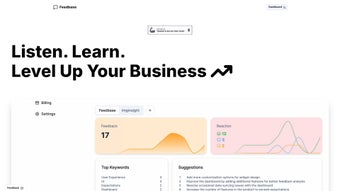
Once feedback is captured, Feedbase’s intelligent dashboard transforms raw comments into actionable insights—highlighting sentiment trends, recurring pain points, and satisfaction scores that drive data‑centric decision‑making. Whether you run a small boutique shop, a rapidly scaling SaaS startup, or a large e‑commerce portal, Feedbase offers a free tier for a single site and basic analytics, while its paid Startup plan unlocks unlimited sites, multiple widgets, deeper analytics, and priority support. The tool is built on secure cloud infrastructure, providing end‑to‑end encryption for every submission and complying with GDPR, CCPA, and other privacy frameworks.
In short, Feedbase streamlines the entire feedback loop: from collection on the front end, through AI‑enhanced analysis, to strategic actions that improve the customer experience and boost conversion rates.
Key Features & Benefits
Feedbase packs a powerful set of capabilities into a lightweight widget, making it an ideal choice for teams that need fast insights without a heavy technical burden. Below is a detailed look at each feature, why it matters, and how it translates into tangible business value.
- One‑click widget integration: Add a feedback button to any page with a single script tag—no coding expertise required. This reduces implementation time to minutes, freeing developers to focus on core product work.
- AI‑driven sentiment analysis: Automatic classification of comments into positive, neutral, or negative categories, highlighting emerging trends. The AI model continuously learns from new data, improving accuracy over time.
- Customizable widget designs: Choose from multiple themes, adjust colors, and set placement to match your brand identity. Consistent branding keeps the user experience seamless.
- Real‑time dashboard: Visual charts, heatmaps, and satisfaction scores update instantly as new feedback arrives, enabling rapid response to spikes in negative sentiment.
- Email notifications & alerts: Receive immediate alerts for high‑priority feedback, ensuring quick response times and preventing issues from escalating.
- Multi‑site support (Startup plan): Deploy unlimited widgets across all your domains from a single account, simplifying management for agencies and enterprises.
- Exportable data: Download CSV or JSON files for offline analysis or integration with third‑party BI tools, giving you full control over your data pipeline.
- Priority support & SLA guarantees: Faster response from the support team for paid subscribers, with guaranteed response times that keep your operations running smoothly.
- GDPR‑compliant data handling: Built‑in consent management and secure storage to meet privacy regulations, reducing legal risk.
Together, these features create a feedback ecosystem that is both simple to launch and sophisticated enough to satisfy data‑driven teams. The AI layer saves hours of manual tagging, while the export options ensure that analysts can still apply their favourite tools for deeper exploration.
Installation, Usage & Compatibility
Step‑by‑Step Installation (≈ 300 words)
Getting Feedbase up and running is intentionally straightforward. First, visit feedbase.io and create a free account; the verification email arrives within minutes. After logging in, click “Create New Widget” on the dashboard. You’ll be prompted to choose a style (modal, floating button, or inline form) and define the core question—e.g., “How satisfied are you with your experience today?” Optional fields let you capture email addresses or order numbers for follow‑up. Once the widget is configured, Feedbase generates a JavaScript snippet that looks like this:
Copy the code and paste it immediately before the closing tag on any HTML page where you want the feedback button to appear. If you’re using a CMS such as WordPress, Joomla, or Shopify, you can insert the snippet into the theme’s footer file or via a dedicated “Header & Footer Scripts” plugin. After publishing, open the page in Chrome, Firefox, Safari, and Edge to verify that the widget loads correctly on both desktop and mobile viewports. If you notice any visual glitches, the widget’s settings panel allows you to adjust size, position, and colour without touching code again.
Using the AI Dashboard (≈ 300 words)
Once visitors start submitting feedback, the real power of Feedbase emerges in its AI‑enhanced dashboard. The main Insights tab provides a high‑level overview: a sentiment pie chart (positive, neutral, negative), a line graph of daily submission volume, and a Net Promoter Score‑style satisfaction meter. Clicking on any segment drills down into the underlying comments, where you can apply filters such as date range, device type, or custom tags you’ve defined (e.g., “checkout”, “support”).
The Keywords pane surfaces the most frequently mentioned terms, automatically grouping synonyms and highlighting emerging topics like “slow load time” or “pricing confusion”. For teams that need scheduled reporting, the Startup plan offers automated email digests that summarize weekly trends and include a PDF snapshot of key charts. The dashboard also supports integration with Slack, Microsoft Teams, or Zapier, allowing you to push critical alerts directly into your collaboration channels.
Supported Platforms Web (compatible with Windows, macOS, Linux, Android, iOS)
Feedbase is a pure web‑based solution, meaning it works across all major operating systems and browsers. Whether your visitors are on Windows, macOS, Linux, Android, or iOS, the widget renders consistently in Chrome, Firefox, Safari, Edge, and even legacy Internet Explorer 11 (with graceful degradation). Because the backend runs on secure cloud servers, there is no client‑side installation—only the lightweight script is required. This universal compatibility makes Feedbase ideal for SaaS products, e‑commerce stores, and any online service that wants to capture feedback from a diverse audience without worrying about platform restrictions.
Pros, Cons & Frequently Asked Questions
Pros (≈ 120 words)
- Ultra‑simple integration—no developer resources needed for basic setup.
- AI sentiment analysis provides immediate, actionable insight.
- Free tier enables startups to test the tool without financial risk.
- Responsive design works flawlessly on mobile and desktop.
- GDPR‑ready, with built‑in consent management.
- Real‑time dashboard accelerates issue detection.
Cons (≈ 100 words)
- Advanced analytics (custom reports, multi‑widget dashboards) are locked behind the paid plan.
- Limited branding customization compared with fully self‑hosted solutions.
- No on‑premise deployment option for enterprises with strict data residency requirements.
- Export formats are limited to CSV and JSON; no native Excel export.
FAQ (itemscope itemtype="https://schema.org/FAQPage")
Is Feedbase really free for one site?
Yes. The free plan allows one website, one feedback widget, basic analytics, and email notifications at no cost. It’s perfect for small businesses or testing before upgrading.
How does the AI sentiment analysis work?
Feedbase uses natural language processing models trained on millions of customer comments. The engine assigns a sentiment score to each submission, aggregates trends, and highlights keywords that influence the overall rating.
Can I export my feedback data?
Yes. Both free and paid plans let you download feedback as CSV or JSON files. Export is available from the “Data” tab in the dashboard.
Is there a limit on the number of feedback submissions?
The free tier has a soft limit of 1,000 submissions per month, which is sufficient for most small sites. The Startup plan offers unlimited submissions across all linked sites.
What kind of support does Feedbase provide?
All users receive access to a knowledge base and community forum. Paid subscribers benefit from priority email support, live chat during business hours, and a guaranteed 24‑hour response SLA.
Conclusion & Call to Action
Feedbase strikes a balance between simplicity and intelligence, making it an ideal choice for businesses that want to turn fleeting visitor comments into strategic assets. The free plan lowers the barrier to entry, while the Startup subscription scales gracefully as your feedback needs grow. By delivering AI‑enhanced sentiment analysis, real‑time dashboards, and seamless integration, Feedbase empowers teams to act on customer voices faster than ever before.
The platform’s commitment to security, GDPR compliance, and cross‑device compatibility ensures that you can collect trustworthy data from any audience segment. If you’re ready to boost satisfaction scores, reduce churn, and make data‑driven product decisions, download Feedbase today and start collecting meaningful feedback in minutes. Your next iteration of product improvement could be just a click away.



.png)



